Reader warns of other readers of hackers invitation
According to an email from one of our readers, “I was recently hacked after receiving what appeared to be a credible online invitation from a friend. I clicked on the invitation, but it did not seem to work. Unfortunately, it did work for the hackers, who were able to gain access to my contact information.
“I later contacted my friend by text to ask about her party and told her I could not view the invitation. She apologized and explained that her account had also been hacked.
“I first attempted to open the message on my cell phone, which allowed access to my Facebook account. Later, when I tried opening my email on my laptop, my email contacts were affected as well. Messages were sent out before I even realized what had happened.
“I am embarrassed that I fell for this scam, and I truly wish it would all just go away. However, I felt it was important to warn others so they can avoid becoming victims themselves.
“I sincerely apologize if you received suspicious messages from my accounts or if this has caused you any inconvenience or concern.
“For your online security and privacy, I sent this email as a blind copy to all recipients.
Thank you for your understanding.”
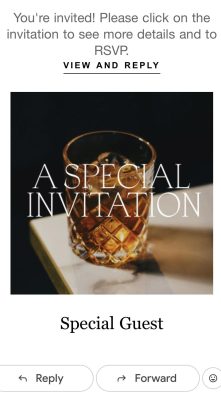
Information on the invite
The “whisky drink invitation” is actually a widespread social engineering scam. Hackers hijack a trusted contact’s email or social media, sending out fake, polished event invitations (e.g., a “whisky tasting,” “birthday,” or “celebration of life”).
The messages prey on social curiosity with common tactics
The Trap
The invitation often includes a harmless-looking button like “View Invitation” or “RSVP.”
The “Device” Ruse
The scam often specifically advises opening the link on a laptop or desktop computer for the “best experience.”
The Payload
Clicking the button does not open an invitation. Instead, it silently downloads malicious software (often remote access tools) that give attackers full control of your system, allowing them to steal saved passwords and hijack your account to spam your contacts.
How to protect yourself
Verify
Never click a link in an unexpected invitation, even if it comes from a close friend or family member. Send a separate, direct text or call them to ask if they actually sent it.
Check the URL
Be highly skeptical of shortened URLs or domains that misspell legitimate invitation platforms (like Evite or Punchbowl).
What to do if you clicked
Disconnect your device from the internet immediately, run a full antivirus scan and change your account passwords from a separate, uncompromised device.